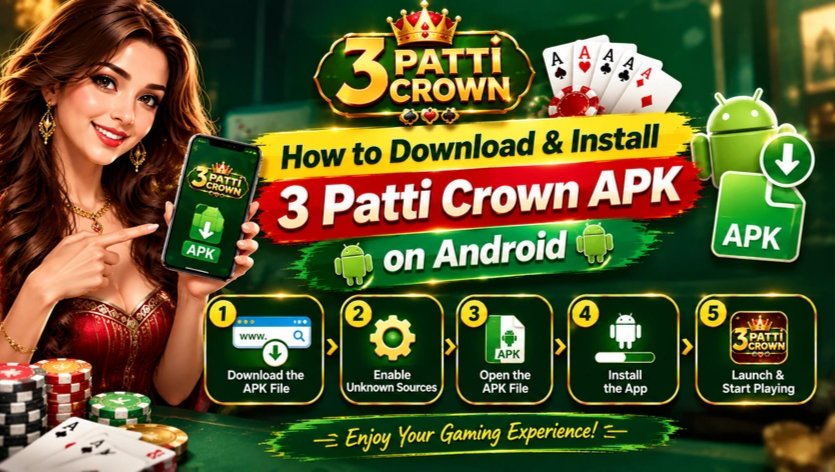
How to Download & Install 3 Patti Crown APK on Android
Step-by-step guide for the latest version (v1.48) — from download to your first login
3 Patti Crown is much more than a single card game. Behind the name is a full gaming app with 55+ games— Teen Patti, Dragon Tiger, Aviator, Zoo Roulette, Rummy, slots and more — plus bonuses, a VIP system and withdrawals through JazzCash and Easypaisa. The one thing that confuses new players is getting it ontothe phone: it is not in the Google Play Store, because it is distributed as an APK file you install directly.
This guide covers the whole process: where to download the official file, the one Android setting to change, how to install it, and what to do on first launch. It takes about three minutes, with no technical knowledge needed.
Quick facts before you download
|
Detail |
3 Patti Crown APK |
|---|---|
|
App name |
3 Patti Crown |
|
Latest version |
v1.48 |
|
File size |
About 40 MB |
|
Android required |
Android 5.0 or higher |
|
Price |
Free to download and install |
|
Official download |
3patticrownvip.com |
At roughly 40 MB, the file is small enough to download even on a slow mobile connection, and Android 5.0+ covers almost every phone in use today, including older and budget models.
Why 3 Patti Crown is APK-only and not on Google Play
Google Play does not list real-money card and casino-style gaming apps for users in Pakistan, so apps like 3 Patti Crown cannot be published there. Instead, the developers release the app as an APK — the standard Android installation file — through their official website. Installing an APK directly is a normal, built-in Android feature used by many gaming and regional apps.
The important point is the source. Download only from the official website. Copies shared through Telegram channels, file-sharing sites or social media posts can be outdated or modified. The steps below use the official site throughout, so the file you install is the genuine v1.48 release.
What you need before you start
- An Android phone or tablet running Android 5.0 or higher.
- About 100 MB of free storage, so the 40 MB file can download and unpack comfortably.
- A stable internet connection, Wi-Fi or mobile data, for the download and first login.
- A few minutes of battery, so the phone does not switch off mid-install.
Step 1: Download the APK from the official website
- Open your browser (Chrome is recommended) and go to the official website, 3patticrownvip.com.
- Tap the Download button on the homepage. The 3 Patti Crown APK file will start downloading.
- Wait for the download to finish. At about 40 MB this usually takes under a minute on 4G or Wi-Fi. You can watch progress in the browser or the notification shade.
- Leave the file where it is. Do not rename it or move it; you will open it from your Downloads in Step 3.
Note: If Chrome warns that the file type could harm your device, this is a standard message shown for every APK downloaded outside the Play Store. If the file came from the official website, tap Download anyway / OK and continue.
Step 2: Allow installs from your browser
By default, Android blocks apps installed from outside the Play Store, so first give your browser permission to install apps. The permission is per-app and reversible — you can switch it off again afterwards.
- Open Settings on your phone and tap Apps (on Samsung phones, go to Settings, then Biometrics and security, then Install unknown apps).
- Find and tap your browser, for example Chrome, in the list of apps.
- Turn on “Allow from this source” / “Install unknown apps”. This one switch is what lets the browser hand the APK to the installer.
On many newer phones you can skip this step: opening the APK in Step 3 takes you straight to this same setting and back again automatically.
Step 3: Install the APK file
- Open the downloaded file. Tap the completed download notification, or open your Files/Downloads folder and tap the 3 Patti Crown APK file.
- Tap Install on the confirmation screen that shows the app name and icon.
- Wait a few seconds while Android installs the app. Do not close the screen during this step.
- Tap Open when the App installed message appears, or tap Done and launch 3 Patti Crown from your home screen or app drawer.
The app icon now sits in your app drawer like any other app. If Android offers a Play Protect scan, let it run.
First launch: Logon or Play as Guest
On the first launch, the login screen gives you two ways in. Choosing the right one matters, because it decides whether your balance, bonuses and game progress are protected.
- Logon: the full account option. Log in with your registered account, or create one and bind your mobile number. A bound account keeps your chips, bonuses and VIP progress safe if you change phones, and it is required for deposits and withdrawals. New players who bind their number also unlock the full welcome package — Rs 11 on signup plus Rs 100 on number binding, Rs 111 in total.
- Play as Guest: a quick trial mode that takes you straight into the lobby without registration. It is fine for looking around and trying a game or two, but guest progress is tied to that one device. Anything earned as a guest can be lost if the app data is cleared or the phone changes, so switch to a bound account before you deposit.
Our recommendation is simple: use Guest only for a first look, then register and bind your number before you play seriously or add money.
The 18+ notice on the login screen
Before you enter, the login screen shows an 18+ age notice. 3 Patti Crown involves real-money gaming, so it is strictly for adult players — if you are under 18, do not create an account or play. For adults it is also areminder to play responsibly: set an affordable budget, treat the games as entertainment, and take breaks.
After installation: three quick safety checks
- Check the version. Open the app and confirm it shows v1.48, so you know you have the current release and not an old copy.
- Turn the browser permission back off. Return to Settings, Apps, your browser, and switch off “Install unknown apps” until the next time you need it.
- Only update from the official site. When a newer version is released, download it the same way —from 3patticrownvip.com — rather than accepting update files from chats or groups.
Troubleshooting common install problems
- “Install blocked” message: the Step 2 permission is not on for the app you opened the file from. Enable it for your browser or file manager, then try again.
- “App not installed” or parse error: the download was incomplete or corrupted. Delete the file, download it again from the official website, and make sure you have enough free storage.
- Download will not start: check your connection, pause any VPN, and try Chrome if another browser is failing.
- App opens but will not log in: check your internet connection and try again; if the problem continues, use the in-app customer support option from the lobby.
Download 3 Patti Crown APK now
You now know exactly how the installation works: download the official file, allow the one browser permission, install, and log in. The whole process takes about three minutes and the app itself is free.
Get the latest version here: Download 3 Patti Crown APK v1.48 from 3patticrownvip.com — and remember to bind your mobile number after registering so your Rs 111 welcome bonus and your balance stay protected.